Logo Quiz:Guess Brand Game
- 4.0
- Rating
- 100.00K
- Installs
- Free
- Price
 Analysis by App-foxy
I approached Logo Quiz:Guess Brand Game as the kind of trivia title you open for a short break rather than a game that demands a long commitment. Its idea is easy to understand: identify brands from their logos, make a choice, and keep moving. That simplicity is its main appeal, but it also means the quality of the experience depends heavily on how quickly the game gets you into a round and how fairly each image tests your memory.
This is a free trivia game from Belas Studio, rated for Everyone and available on Android devices running version 7.0 or later. It has reached over 100 thousand installs and holds an average rating of 4.2 from around 2.3 thousand ratings, so it has attracted a reasonably broad audience for a focused logo quiz. I found it most enjoyable when I treated it as a casual recognition challenge: something to play while waiting, share with a friend, or use as a light mental warm-up.
Where players usually get stuck
The first difficulty is not necessarily the answer itself. It is learning how the game expects you to think about a logo. A familiar symbol may belong to a parent company, a product line, a sports organization, a restaurant chain, or a technology service. If you search your memory only for the exact visual mark, you can miss an answer that you know perfectly well in another context.
You May Also Like

 Pandora - Music & Podcasts
Pandora’s Music Is Easy to Start, but Harder to Recover
Pandora’s strength is its low-effort path from a seed to a station. Its weak spot is how much confidence it asks you to place in connection, setup, and quiet recovery.

 8 Ball Pool
 Is Built on Rivalries, Rematches, and Routine
A close look at the rivalries, rematches, shared routines, and unanswered safety questions that turn a quick pool match into a persistent mobile community.

 Samsung Music
’s Quiet Strength Is Playing What You Already Own
Its reach comes less from spectacle than from dependable access to a personal library. That simplicity is both the app’s strongest retention engine and its ceiling.

 AccuWeather: Weather Radar
AccuWeather Review: A Quick, Clear Forecast for Everyday Decisions
For everyday plans, the best forecast is the one you can understand quickly. AccuWeather makes rain timing, radar, and local conditions easy to act on, with a few trade-offs.

 Hill Climb Racing
Why Hill Climb Racing Still Turns Crashes Into One More Run
A tiny car, a bumpy hill and one more upgrade: Hill Climb Racing keeps resurfacing because its simple chaos makes every near-miss feel personal.

 AliExpress - Shopping App
AliExpress Makes Global Shopping Feel Personal, but Shoppers Bear the Risk
AliExpress turns a global marketplace into a pocket-sized discovery engine. Its reach is useful, its shopping loop compelling, and its trade-offs easy to miss.
More From Our News Desk
View All News


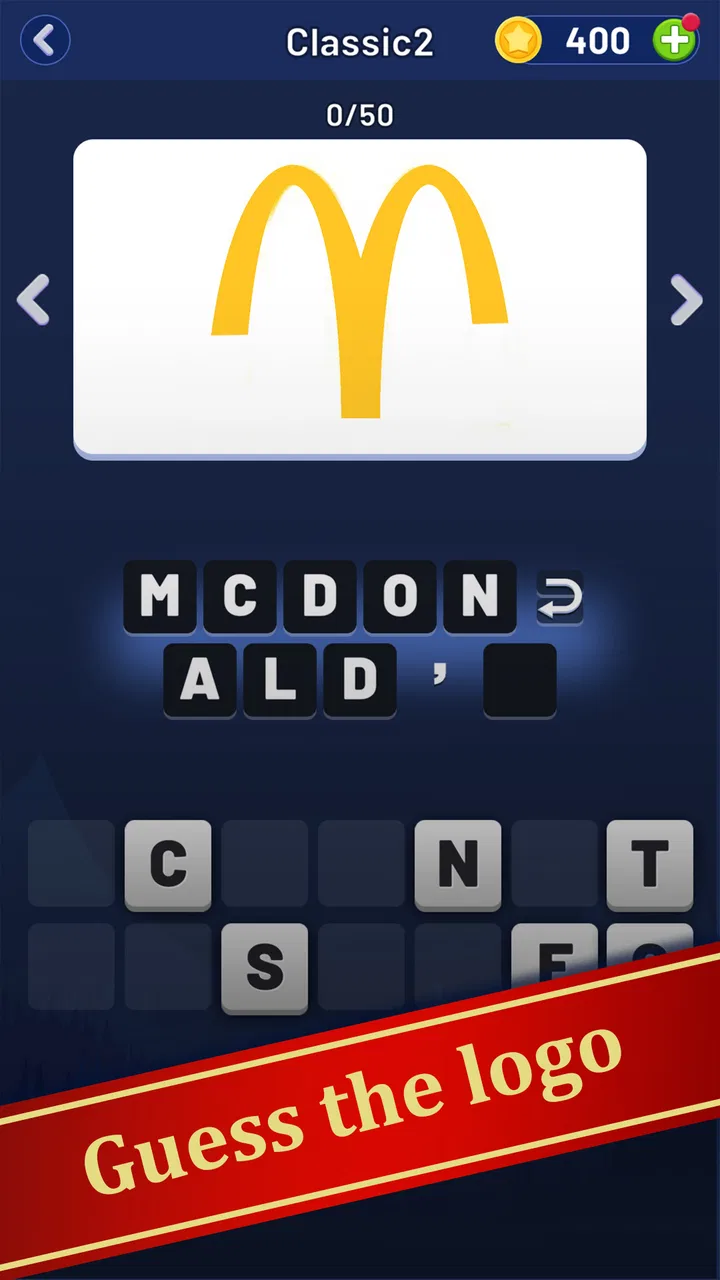
I recommend looking at the whole image before focusing on one letter or shape. Color, spacing, a distinctive curve, and even the amount of empty space can be more useful than the central symbol. When I recognized only part of a logo, I found it better to name the industry first, then narrow the possibilities. “This looks like a food brand” is a more productive starting point than repeatedly guessing random names.
Another sticking point is the difference between recognition and spelling. Logo quizzes often reward knowing the brand but still require you to select or enter the expected name in the game’s own format. A player can therefore feel certain about the answer and still hesitate because of capitalization, abbreviations, or a shortened brand name. Before assuming the round is wrong, check whether the game is asking for the common public-facing name rather than the company’s formal name.
The game is also less satisfying for people who want detailed explanations after every response. Its central loop is identification, not a lesson about brand history. That makes it quick and accessible, but it does not turn each question into a research session. If you prefer trivia apps that explain why an answer is correct, provide long fact cards, or build a subject around geography and history, a broader quiz alternative may suit you better.
Use the social option deliberately
The ability to play with friends is more useful when you create a simple rule around it instead of passing the phone back and forth without a plan. One person can read the logo while everyone writes a guess privately, or you can give each player a short time to answer before comparing results. This keeps the focus on recognition rather than on whoever happens to hold the device.
That format works especially well with mixed-age groups because the age rating is Everyone and the subject is familiar enough for casual participation. Younger players may recognize current brands, while older players may have an advantage with logos they have seen for years. The game becomes more interesting when you let those different kinds of memory balance each other.
There is a practical limitation, though: a logo quiz is not automatically a good party game just because friends can join. If your group wants deep competition, formal scoring, or a large range of subjects, this focused format may feel narrow after several rounds. I would choose it for a quick shared challenge, not as the only game for a long evening.
Setup checks before blaming the game
Because this is a lightweight concept, the initial setup should be straightforward, but a few basic checks can prevent unnecessary frustration. Confirm that the device meets the minimum Android requirement of 7.0 or later, then install the current release, version 1.1.9. Keeping the app current is sensible when a round behaves unexpectedly, since an update can address compatibility problems without changing the fundamental quiz experience.
If the game opens slowly or appears not to respond, I would first close other demanding apps and reopen it rather than repeatedly tapping the same control. Repeated taps can make a simple interface feel broken when it is only processing the previous action. A clean restart is a safer first step than changing several phone settings at once, because it lets you identify whether the problem was temporary.
It is also worth checking the device’s available storage and general responsiveness. A phone that is already struggling with other apps may make a small trivia game appear unreliable even when the quiz itself is functioning normally. Restarting the device can help distinguish a one-off system slowdown from a repeatable issue inside the game.
Players should also understand the cost model before settling into regular use. The game is free to download, while in-app purchases are listed at $3.99 per item. That does not automatically make the free experience poor, but it does mean I would look carefully at any purchase prompt and decide whether it solves a real problem for me. For a casual logo game, paying should feel optional rather than necessary to enjoy the basic challenge.
If you are handing the phone to a child, the Everyone rating is reassuring for the intended audience, but I would still supervise purchases through the device’s normal controls. The age rating describes the content, not how a particular phone handles purchase confirmation. This is a small setup habit that avoids surprises without making the game harder to use.
A reliable first-session routine
My preferred setup routine is simple. I open the game when the phone is responsive, play a few rounds without trying to rush, and observe whether the controls react consistently. I then decide whether I want a solo session or a friend-based challenge. This gives me a baseline, so if the app later behaves differently I can tell whether the issue is with a specific round, the device, or the surrounding conditions.
I also avoid judging the entire game from one difficult logo. Brand familiarity varies enormously between players, and a logo that seems obvious to one person may be completely outside another person’s daily life. A fairer test is to play enough rounds to see whether the difficulty feels varied and whether the recognition process remains enjoyable after the novelty fades.
For people using an older Android phone, this routine matters more than chasing maximum visual quality. The appeal here is the thinking task, not advanced graphics. If the device can run the required Android version and remains stable during ordinary use, there is little reason to expect a newer phone to transform the core quiz.
Recovering your workflow when a round goes wrong
When I get stuck, I use a three-pass method. First, I describe the logo without naming it: its colors, shape, text style, and likely industry. Second, I list related brands from that industry. Third, I return to the image and remove guesses that do not match the visual details. This prevents the common mistake of locking onto the first brand that comes to mind simply because it is familiar.
A useful variation is to think about where you have seen the logo rather than what the company sells. Was it on packaging, a storefront, an app icon, a vehicle, a sports shirt, or a website? The setting can trigger memory more effectively than the logo’s design. This is one of the reasons I find the game more engaging with another person: someone else may remember the context even when neither player can immediately name the brand.
If the interface seems stuck after an answer, pause before attempting a complicated fix. Wait briefly, tap only once, and then restart the game if the screen still does not move. If the same behavior returns, note exactly when it happens: during launch, after selecting an answer, while moving to another round, or around a purchase prompt. That detail is much more useful than saying only that the game “doesn’t work.”
Clearing an app’s temporary cache can sometimes help with ordinary Android app problems, but I would treat it as a later step and check the phone’s settings carefully before using it. I would not clear stored app data casually, because that can remove local progress or preferences. The safer order is close and reopen, restart the device, check for the current version, and only then consider more disruptive maintenance.
If a friend cannot join or the shared session feels awkward, simplify the activity rather than assuming the game has failed. Use one device and alternate turns, or let everyone make guesses at the same time. The store summary presents the title as something that can be played with friends, but the most dependable social arrangement is often the one you organize yourselves around the same screen.
How to make short sessions more rewarding
I get more from the game when I set a small goal for each session. Instead of trying to finish as quickly as possible, I might focus on identifying logos by industry or on remembering the answer to a logo that initially fooled me. This turns a missed question into a memory exercise and reduces the temptation to treat every mistake as a failure.
Another practical habit is to keep a mental list of confusing visual patterns. Several brands can use similar colors, geometric marks, or minimalist lettering. When I notice that a particular style causes mistakes, I slow down on the next similar image and inspect the details rather than relying on a fast association. That approach makes the quiz feel more skill-based and less dependent on lucky guesses.
For a family session, I would avoid giving the fastest player control of every decision. Let one person describe the logo, another suggest the industry, and a third make the final selection. This keeps less experienced players involved and makes the game more than a test of who has seen the most advertising.
When the app is not the cause
Some apparent problems are really environmental. A weak connection, aggressive battery-saving settings, limited storage, or a phone under heavy load can affect how any app opens and responds. If other applications are also slow, crash, or fail to refresh, I would investigate the device first instead of treating this particular quiz as the source of the trouble.
Purchase-related interruptions deserve the same distinction. If a transaction does not complete, that may involve the device’s app store account, payment method, parental controls, or network connection rather than the quiz content itself. I would avoid repeated purchase attempts until the account side is clear, especially because each in-app item is priced at $3.99.
A display problem can also be mistaken for a wrong answer. Brightness, screen glare, accessibility settings, and a damaged display may hide small visual details in a logo. Changing the viewing angle, cleaning the screen, or trying the game under better lighting can make a surprising difference. This matters because the challenge depends on seeing shapes and text accurately; an unclear image is not a fair test of memory.
There is also a human factor. If I play while distracted, tired, or surrounded by conversation, I make more errors on logos I would normally recognize. That does not mean the game has suddenly become inconsistent. A short pause and a quieter setting often tell me whether the difficulty is coming from the round or from my attention.
Players who expect every logo to be globally familiar may also feel that the game is unfair when the real issue is cultural exposure. Brand recognition is shaped by country, age, language, shopping habits, and internet use. I would judge the title by whether it gives me an enjoyable mix of approachable and challenging images, not by whether every answer happens to be part of my own daily life.
My practical verdict after using it
Logo Quiz:Guess Brand Game is a good fit for someone who wants a direct, low-pressure trivia game built around visual memory. I like that the premise is immediately understandable, that a round can fit into a spare moment, and that the same image can become a friendly argument when played with someone else. Belas Studio has kept the focus narrow, which helps the game start quickly and makes it accessible to casual players.
I would recommend it to families, friends who enjoy identifying brands, and players who prefer short challenges over lengthy quiz sessions. It is particularly useful as a waiting-room game or a quick break activity: open it, solve a handful of logos, and stop without needing to remember a complicated story or control system. The Everyone rating also makes it easier to consider for shared household use, while the free entry point lets you try the basic experience before deciding whether any optional item is worthwhile.
I would skip it if you want a deep trivia database, detailed explanations, competitive online structure, or a wide range of subjects in one app. A general knowledge quiz will be better for players who want history, science, geography, and current events mixed together. A dedicated multiplayer trivia title may also be the stronger choice for organized tournaments. This game’s strength is concentration, not breadth.
The rating of 4.2 suggests a generally positive reception, but I would interpret it alongside the game’s narrow design. A solid logo quiz does not need to become something larger to be enjoyable; it simply needs to make recognition feel fair and keep the interaction smooth. My main advice is to check the Android requirement, start with a clean session, treat difficult logos as memory puzzles rather than instant tests, and be deliberate around the optional $3.99 purchases.
In the end, I see this as a pleasant casual title rather than an essential trivia companion. Its best moment is a short, shared challenge where one person recognizes the symbol, another remembers where it was seen, and everyone debates the answer before moving on. If that kind of lightweight brand-spotting sounds fun, the free version is easy to justify trying. If you need richer facts or a broader quiz structure, choosing a more expansive alternative will save you from expecting this focused game to do a different job.
FAQs for Logo Quiz:Guess Brand Game
01What is Logo Quiz: Guess Brand Game about?
Logo Quiz: Guess Brand Game is a fun and challenging trivia game that tests your knowledge of brand logos from around the world. Players are tasked with identifying logos from a range of categories, including food, technology, and fashion. The game offers multiple levels of difficulty, providing an engaging experience for players of all ages.
02Is Logo Quiz: Guess Brand Game free to play?
Yes, Logo Quiz: Guess Brand Game is free to download and play. However, it does offer in-app purchases for hints and additional features that can enhance the gaming experience. These purchases are optional, and the game can still be enjoyed without spending any money.
03What features does Logo Quiz: Guess Brand Game offer?
The game features hundreds of logos to guess, organized into various levels and categories. It offers hints and clues to help players when they are stuck. The game also includes a leaderboard, allowing players to compete with friends or globally. Regular updates ensure new logos and challenges are added frequently.
04Does Logo Quiz: Guess Brand Game require an internet connection?
Logo Quiz: Guess Brand Game can be played offline, making it convenient for users without constant internet access. However, an internet connection is required for accessing leaderboards, updates, and purchasing in-app products. This flexibility allows for consistent gameplay anywhere, anytime.
05How can I get help if I'm stuck on a logo?
If you're stuck on a logo, the game provides various hints and clues to assist you. These can be earned by completing levels or purchased through in-app purchases. Additionally, players can ask friends for help directly within the app, making it a socially engaging experience.
Pros
- Extensive range of brands to guess.
- Simple and intuitive user interface.
- Regular updates with new logos.
- Offline play available for on-the-go fun.
- Hints to assist when you're stuck.
Cons
- Repetitive ads can be intrusive.
- Some logos are outdated.
- Limited hints without in-app purchases.
- Occasional crashes on older devices.
- Lacks multiplayer or social features.

Logo Quiz:Guess Brand Game
Gallery